Motf EnableLaserRegulation
Enables laser parameter regulation as a function of MOTF speed.
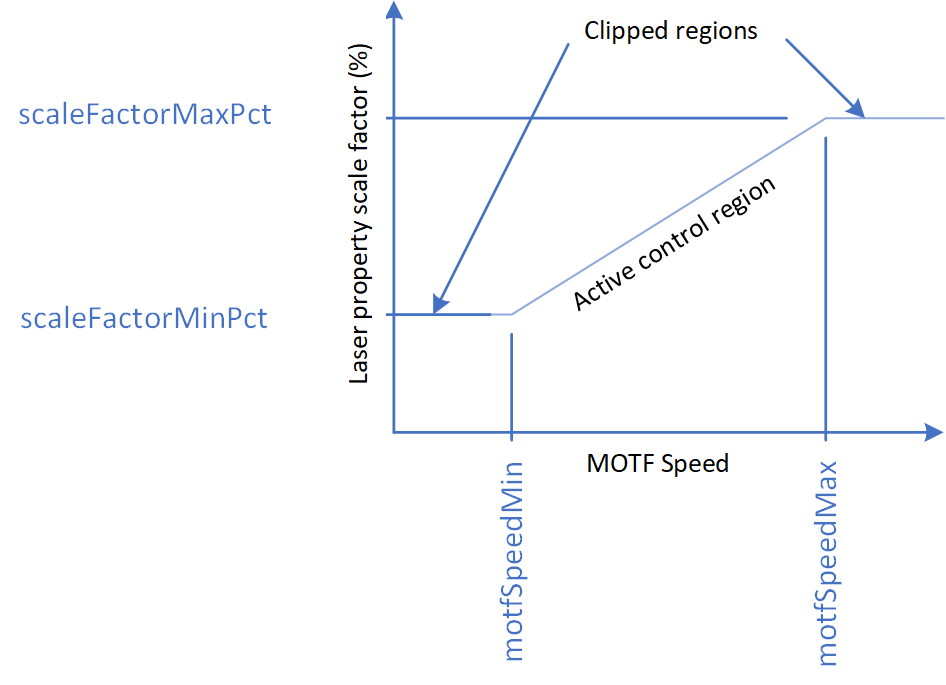
The first two arguments let you specify the range of web speeds over which a linear scaling of a selected laser parameter, determined by the optional argument LaserRegMode, will take place. If the belt speed is reduced to below motfSpeedMin, the selected laser parameter will be clamped at scaleFactorMinPct times the current set-point of the parameter. If the web speed exceeds motfSpeedMax the selected laser parameter will be clamped at scaleFactorMaxPct times the current set-point of the parameter.
Over the web speed range between motfSpeedMin and motfSpeedMax, the current set-point of the selected laser parameter is linearly scaled between scaleFactorMinPct and scaleFactorMaxPct.
Syntax
| EnableLaserRegulation( float motfSpeedMin, float motfSpeedMax, float scaleFactorMinPct, float scaleFactorMaxPct, LaserRegMode laserRegMode) |
Parameters
| motfSpeedMin | float | Minimum specified MOTF speed that scaling will be applied. |
| motfSpeedMax | float | Maximum specified MOTF speed that scaling will be applied. |
| scaleFactorMinPct | float | Scale factor in % applied the laser parameter set-point when the MOTF speed is at the minimum specified value. |
| scaleFactorMaxPct | float | Scale factor in % applied the laser parameter set-point when the MOTF speed is at the maximum specified value. |
| laserRegMode | LaserRegMode | Optional setting of the laser property to be regulated. Default is DutyCycle. |
Text-- This sample images a square at equal spacing using Laser Regulation
SetUnits(Units.Millimeters)
-- Use MOTF Port 0
MOTF.Mode = Encoder.ExternalSingleAxis
-- Web direction
MOTF.Direction = Direction.BottomToTop
-- 10um linear resolution for example
encoderLinResInMmPerCount = 0.010
-- Bits/Mm * Mm/Count -> Bits/Count
MOTF.CalFactor = System.CalFactorY *
encoderLinResInMmPerCount

-- Initialize the MOTF settings
MOTF.Initialize()

-- Initialize laser/scan-head settings
Laser.MarkSpeed = 5000
Laser.MarkDelay = 200
Laser.JumpSpeed = 10000
Laser.JumpDelay = 200
Laser.Frequency = 20
Laser.DutyCycle1 = 90
Laser.Power = 50
Laser.LaserOnDelay = 75
Laser.LaserOffDelay = 125
Laser.PolyDelay = 50
Laser.VariPolyDelayFlag = true

-- Initialize Laser Regulation
minWebSpeedInMmPerSec = 0
maxWebSpeedInMmPerSec = 500
laserPropertyScaleAtMinWebSpeedInPct = 10
laserPropertyScaleAtMaxWebSpeedInPct = 100

MOTF.EnableLaserRegulation(minWebSpeedInMmPerSec, maxWebSpeedInMmPerSec,
laserPropertyScaleAtMinWebSpeedInPct, laserPropertyScaleAtMaxWebSpeedInPct,
LaserRegMode.DutyCycle)

-- Wait for this web travel before marking
partDistance = 50.

-- Wait here for the start signal
IO.WaitForIo(Pin.Din.UserIn1,Trigger.Edge.Rising, 0, 0, true)

-- Initialize to wait the initial distance
MOTF.ResetTracking()
System.Flush()
-- Repeat until aborted via external signal
while IO.ReadPin(Pin.Din.UserIn4) == false do
    MOTF.WaitForDistance(partDistance)
    -- Counters are automatically reset when WaitForDistance() releases
    MOTF.StartTracking(Tracking.WhileMarking)
    Image.Box(-10, -10, 20, 20)
    MOTF.StopTrackingAndJump(0, 0, 0, 200)
    Laser.WaitForEnd()
    -- Counters are still counting and distance being measured
    -- The next two lines if uncommented are for diagnostics
    -- webSpeedInBitsPerMsec = IO.ReadPort(Port.Advanced.MOTFFrequency1)
    -- Report("Web speed in mm/sec: " .. (webSpeedInBitsPerMsec * 1000) / System.CalFactorY)
end

Report ("Job Finished")
-- Turn off laser reglation
MOTF.DisableLaserRegulation()